MCP (Model Control Protocol)
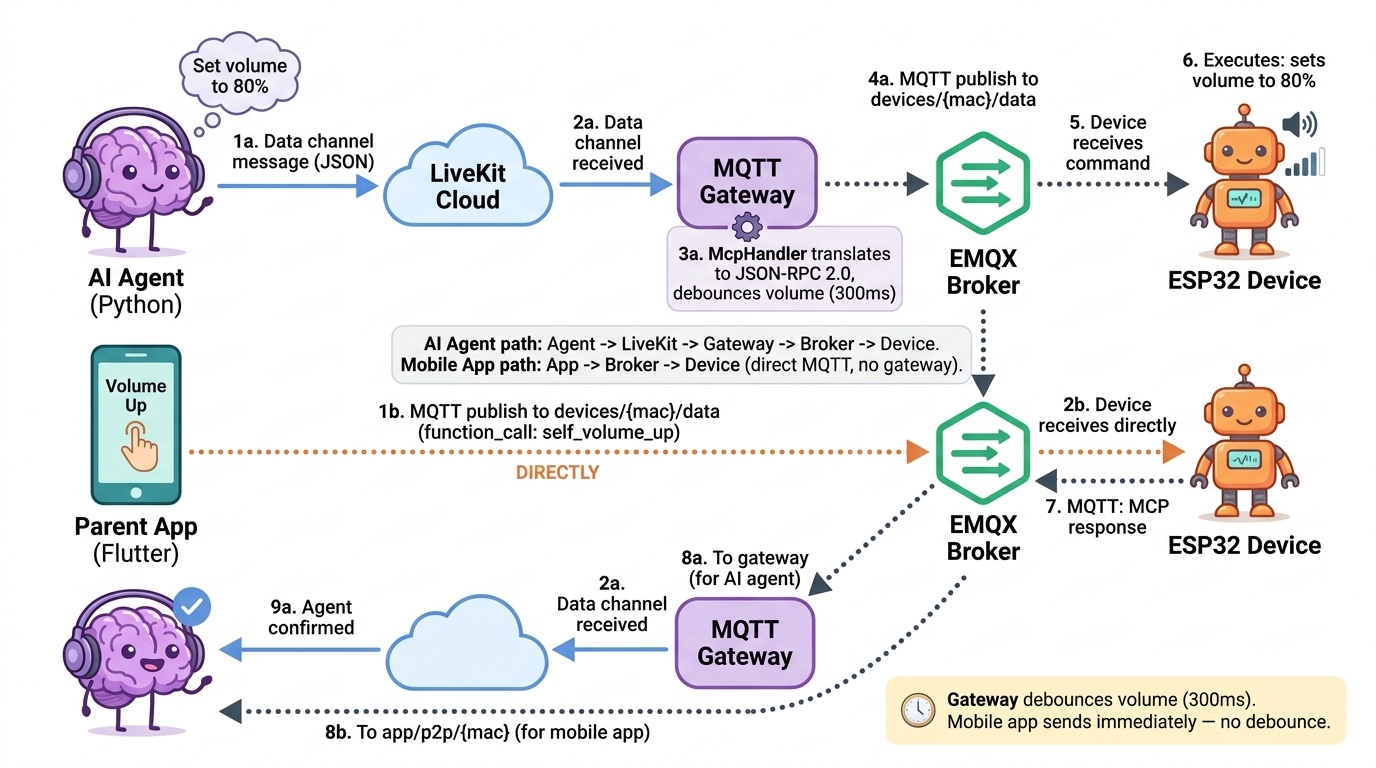
MCP is the internal JSON-RPC-based protocol that allows AI agents running in livekit-server (Python) to control ESP32 hardware functions — volume, LED lighting, and battery status — through the MQTT gateway. Commands travel from the AI agent over a LiveKit data channel to the gateway, which reformats them as MQTT messages and forwards them to the ESP32 device. Responses travel the reverse path.
Flow Diagram
AI Agent (Python)
      |
      | publish_data() on topic "mcp_function_call"
      | (JSON, reliable=true)
      v
LiveKit Data Channel
      |
      v
mqtt-gateway  (mcp-handler.js  McpHandler.handleFunctionCall)
      |
      | sendMqttMessage()
      | JSON-RPC 2.0 envelope  {type:"mcp", payload:{jsonrpc:"2.0", method:"tools/call", ...}}
      v
MQTT Broker (EMQX)
      |
      v
ESP32 Device  --  executes hardware command
      |
      | MQTT response
      v
mqtt-gateway  (McpHandler.handleMcpResponse)
      |
      v
LiveKit Data Channel
      |
      v
AI Agent  (LiveKitMCPClient.handle_response)
Available MCP Functions
All function names are as they appear in the Python source (mcp_handler.py / mcp_executor.py) and in the JavaScript gateway (mcp-handler.js).
Python-side function names (agent to gateway)
These are the names placed in the function_call.name field when the Python agent publishes to the mcp_function_call data-channel topic.
| Function name | Direction | Arguments | Description |
|---|---|---|---|
self_set_volume | agent → device | {"volume": int} (0–100) | Set absolute volume level |
self_volume_up | agent → device | {"step": int} (1–50) | Increase volume by step |
self_volume_down | agent → device | {"step": int} (1–50) | Decrease volume by step |
self_get_volume | agent → device | {} | Request current volume level |
self_mute | agent → device | {} | Mute device (volume = 0) |
self_unmute | agent → device | {} | Unmute device |
self_set_light_color | agent → device | {"red": int, "green": int, "blue": int} | Set LED color via RGB values (0–255 each) |
self_set_light_mode | agent → device | {"mode": string} | Set LED mode (rainbow, default, custom, etc.) |
set_rainbow_speed | agent → device | {"speed_ms": int} (50–1000) | Set rainbow animation speed in milliseconds |
self_get_battery_status | agent → device | {} | Request battery level, voltage, and charging state |
Gateway-side function names (gateway to device, JSON-RPC tools/call)
The gateway (mcp-handler.js) re-routes some Python names to different device-facing names:
| Gateway method sent to device | Triggered by Python function | Arguments forwarded |
|---|---|---|
self.audio_speaker.set_volume | self_set_volume | {"volume": int} |
self.audio_speaker.mute | self_mute | {} |
self.audio_speaker.unmute | self_unmute | {} |
self.led.* (pass-through) | any self.led. prefixed call | forwarded as-is |
self.get_device_status | self.get_device_status | {} |
Battery response payload (device to agent)
The device returns battery data as a JSON string inside a content array. The Python get_battery_status() method parses it:
| Field | Type | Description |
|---|---|---|
percentage | int | Battery level 0–100 |
voltage_mv | int | Voltage in millivolts |
charging | bool | Whether the device is currently charging |
state | string | "normal", "low", or "critical" |
Agent Side (Python)
Source: main/livekit-server/src/mcp/
LiveKitMCPClient
mcp_client.py — low-level transport layer.
LiveKitMCPClient holds a reference to the LiveKit agent context and publishes raw JSON messages over the room's data channel.
Key method:
async def send_function_call(
    self,
    function_name: str,
    arguments: dict = None,
    wait_for_response: bool = False
) -> dict
- Constructs a message with
type="function_call",function_call.name,function_call.arguments, a millisecond-precisionrequest_id(req_<ms_timestamp>), and an ISO-8601timestamp. - Publishes via
room.local_participant.publish_data(..., topic="mcp_function_call", reliable=True). - When
wait_for_response=True, registers anasyncio.Futurekeyed byrequest_idand awaits it with a 10-second timeout. If the timeout fires, it returns{"error": "timeout", "message": "No response received from device"}.
Response matching in handle_response():
- Attempt exact match on
request_id. - If not found, fall back to the first incomplete future in the map (handles single-in-flight scenarios such as battery checks).
DeviceControlService
device_control_service.py — alternative direct-call path (does not use LiveKitMCPClient internally; publishes directly). Maintains its own _current_volume cache. Provides the same high-level methods as LiveKitMCPExecutor:
set_volume(level),get_volume(),volume_up(step),volume_down(step),mute(),unmute(level)update_volume_cache(level)— called externally when a device response updates the known volume.
MCP Executor
mcp_executor.py — LiveKitMCPExecutor wraps a LiveKitMCPClient instance and adds:
- Input validation (volume range 0–100, step range 1–50, speed range 50–1000 ms).
- A
_volume_cachefor optimistic UI responses. - Color name-to-RGB conversion via an internal map (supported names:
red,green,blue,white,yellow,purple,orange,pink,cyan,magenta,off). - High-level methods:
set_volume,adjust_volume,get_volume,mute_device,unmute_device,set_light_color,set_light_mode,set_rainbow_speed,get_battery_status.
mcp_handler.py contains the thin handler functions (handle_volume_set, handle_volume_adjust, handle_volume_get, handle_volume_mute, handle_light_color_set, handle_battery_status_get, handle_light_mode_set, handle_rainbow_speed_set) that call send_mcp_function_call() which ultimately calls mcp_client.send_function_call().
Gateway Side (Node.js)
Source: main/mqtt-gateway/livekit/mcp-handler.js
McpHandler
McpHandler is constructed with a bridge reference that provides access to the MQTT connection. It maintains:
pendingMcpRequests— aMapfrom numeric MCP request ID to{ callId, method, timestamp }.mcpRequestCounter— an auto-incrementing integer used as the JSON-RPCid.- Volume debounce state (
volumeDebounceTimer,pendingVolumeAction,lastKnownVolume).
Routing logic in handleFunctionCall(data):
| Condition | Handler called |
|---|---|
function_call.name starts with self.audio_speaker. | handleAudioSpeakerFunction |
function_call.name starts with self.led. | handleLedFunction (pass-through to sendMcpRequest) |
function_call.name === 'self.get_device_status' | handleGetDeviceStatus |
| anything else | warning logged, no action |
sendMcpRequest(method, args, callId) builds the JSON-RPC envelope and calls bridge.connection.sendMqttMessage(JSON.stringify(mcpRequest)).
handleMcpResponse(response) looks up the pending entry by response.payload.id, removes it from the map, and logs the match. Forwarding the response back to the LiveKit agent is noted as a TODO in the current code.
Volume Debouncing
When multiple self.audio_speaker.set_volume calls arrive in quick succession (e.g., the user saying "turn it up a lot"), the gateway coalesces them into a single MQTT message:
- Each call to
handleSetVolume(volume, callId)stores{ volume, callId }inpendingVolumeAction. - Any existing debounce timer is cancelled (
clearTimeout). - A new 300 ms timer is started.
- When the timer fires, only the most-recent
pendingVolumeActionis dispatched tosendMcpRequest.
This prevents the ESP32 from being flooded with rapid volume-change messages.
MQTT Message Format
MCP Request — LiveKit data channel payload (Python agent to gateway)
Published by LiveKitMCPClient.send_message() on topic mcp_function_call:
{
  "type": "function_call",
  "function_call": {
    "name": "self_set_volume",
    "arguments": {
      "volume": 60
    }
  },
  "timestamp": "2026-03-24T10:15:30.123456",
  "request_id": "req_1742811330123"
}
MCP Request — MQTT message (gateway to ESP32 device)
Built by McpHandler.sendMcpRequest() and sent via sendMqttMessage():
{
  "type": "mcp",
  "payload": {
    "jsonrpc": "2.0",
    "method": "tools/call",
    "params": {
      "name": "self.audio_speaker.set_volume",
      "arguments": {
        "volume": 60
      }
    },
    "id": 42
  }
}
MCP Response — MQTT message (ESP32 device to gateway)
{
  "type": "mcp",
  "payload": {
    "jsonrpc": "2.0",
    "id": 42,
    "result": {
      "content": [
        {
          "type": "text",
          "text": "{\"percentage\": 78, \"voltage_mv\": 3950, \"charging\": false, \"state\": \"normal\"}"
        }
      ]
    }
  }
}
The id field in the response matches the id in the original request, allowing McpHandler.handleMcpResponse() to correlate the pair via pendingMcpRequests.
For battery responses the result.content[0].text field carries a JSON-encoded string that LiveKitMCPExecutor.get_battery_status() parses to extract percentage, voltage_mv, charging, and state.
Example: Volume Up Flow
This example traces the complete path when the AI agent decides to increase volume by 10 steps.
- The AI agent calls
LiveKitMCPExecutor.adjust_volume(action="up", step=10). adjust_volumevalidates the action and step, then callshandle_volume_adjust(mcp_client, "up", 10)frommcp_handler.py.handle_volume_adjustselects function nameself_volume_up(because action is"up") and callssend_mcp_function_call(mcp_client, "self_volume_up", {"step": 10}).send_mcp_function_callcallsmcp_client.send_function_call("self_volume_up", {"step": 10}).LiveKitMCPClient.send_function_callconstructs the message:{
"type": "function_call",
"function_call": { "name": "self_volume_up", "arguments": { "step": 10 } },
"timestamp": "2026-03-24T10:15:30.123456",
"request_id": "req_1742811330123"
}- The message is published via
room.local_participant.publish_data(..., topic="mcp_function_call", reliable=True)to the LiveKit data channel. - The
mqtt-gatewayreceives the data-channel message and callsMcpHandler.handleFunctionCall(data). - The function name
self_volume_updoes not matchself.audio_speaker.*,self.led.*, orself.get_device_status, so it falls through to the warning branch. (Note: the gateway currently handles theself.audio_speaker.*namespace;self_volume_upwould need the Python agent to use the gateway's namespace, or the gateway routing to be extended.) - For the
self.audio_speaker.set_volumevariant,McpHandler.handleSetVolume(volume, callId)is called, which stores the action and starts a 300 ms debounce timer. - After 300 ms with no further volume calls, the timer fires and
sendMcpRequest("self.audio_speaker.set_volume", { volume: 60 }, callId)executes. sendMcpRequestassigns the nextmcpRequestCountervalue (e.g.,42) as the JSON-RPCid, stores{ callId, method, timestamp }inpendingMcpRequests, and callsbridge.connection.sendMqttMessage()with the JSON-RPC envelope.- The MQTT broker delivers the message to the ESP32 device.
- The ESP32 adjusts hardware volume and publishes an MQTT response with
id: 42. McpHandler.handleMcpResponse(response)finds the entry forid=42inpendingMcpRequests, logs the match, and removes the entry.- Back on the Python side, if
wait_for_response=Truewas set,LiveKitMCPClient.handle_response()resolves the correspondingasyncio.Futurewith the response data. The executor then returns a human-readable string such as"Volume increased to 70%."to the AI agent.