RFID Cards
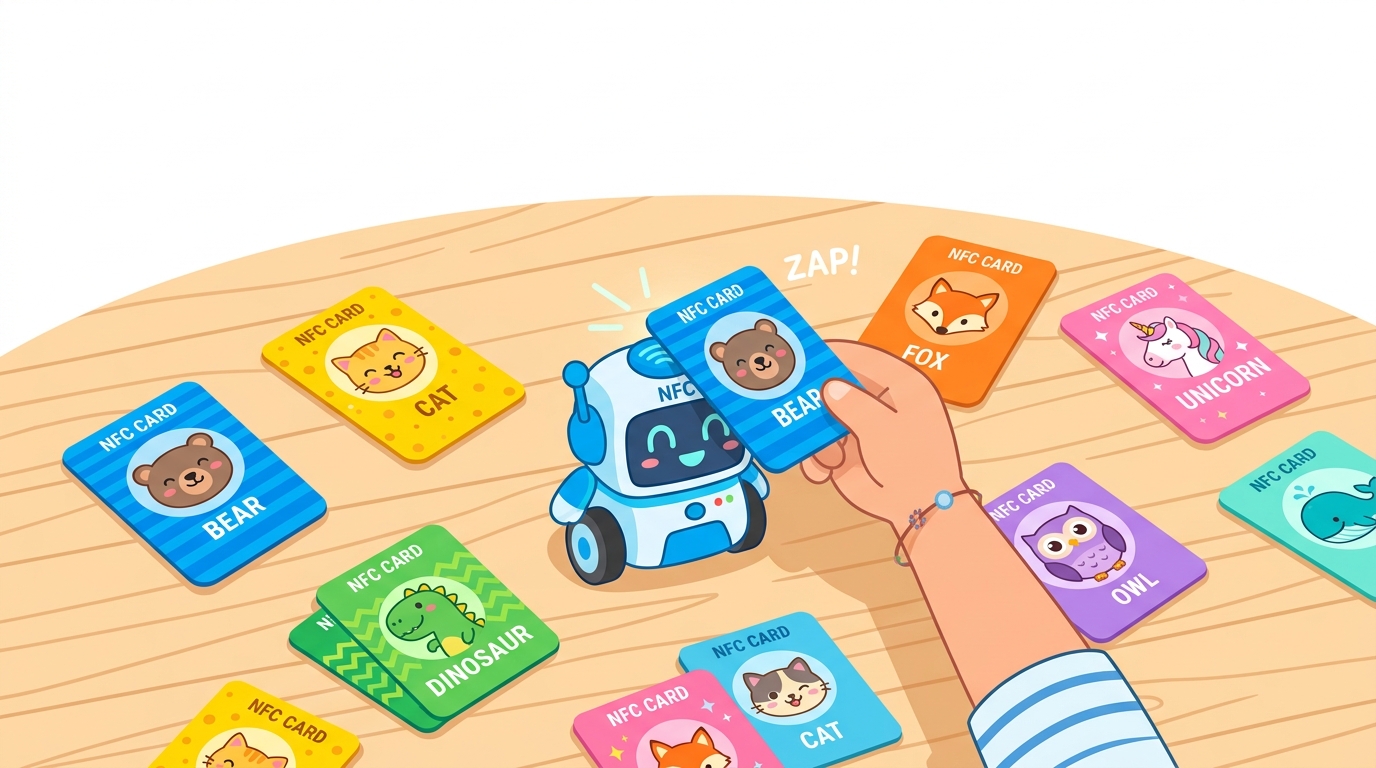
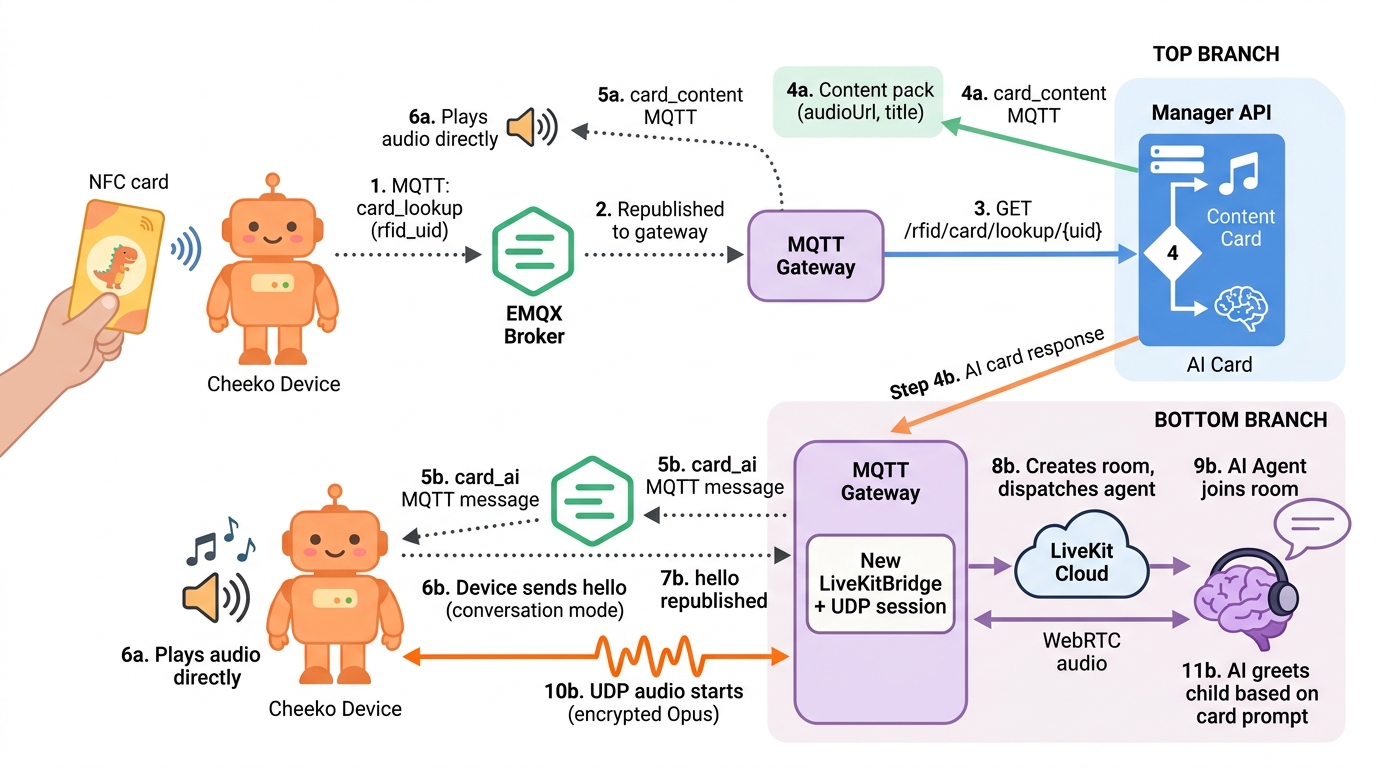
RFID cards are physical NFC/RFID cards that children tap on the Cheeko device to instantly trigger AI interactions or content playback. A card tap is the primary non-voice interaction on the device — it replaces typing or menu navigation with a simple physical action a 3-year-old can perform.
Cards fall into three categories:
- Content cards — pre-recorded story packs, rhyme packs, and habit packs. Tapping delivers an audio manifest directly to the device. No LiveKit or LLM is involved.
- Q&A cards (
prompt/prompt_pack) — a specific question prompt is forwarded to the LiveKit AI agent, which generates a spoken answer. The conversation is question-scoped: the agent answers the prompt, not a free chat. - AI conversation cards (
card_type=ai) — triggers open, unscripted conversation with the AI agent. No prompt text is sent — the card just signals the agent to start an interactive conversation session with the child.
How It Works (Overview)
Card tapped on device
    │
    ▼
ESP32 checks SD card cache (cardmap.jsn)
    │
    ├─ Cache hit + manifest exists → play content from SD (offline, no network)
    │
    └─ Cache miss → MQTT card_lookup to gateway
                        │
                        ▼
               Gateway calls Manager API
               GET /toy/admin/rfid/card/lookup/{uid}
                        │
                        ▼
               Gateway classifies response by data shape:
               ┌─────────────────────────────────────────┐
               │ items have audioUrl?  → Content Pack     │
               │ items have promptText? → Q&A Pack        │
               │ top-level promptText?  → Single Prompt   │
               │ card_type = ai?        → AI Conv. Card   │
               │ no match?             → card_unknown     │
               └─────────────────────────────────────────┘
                        │
          ┌─────────────┼──────────────────┐
          ▼             ▼                  ▼
    Content Pack      Q&A Card          AI Card
  download_response  forward promptText  send card_ai
  device plays audio  to LiveKit agent   device prewarms
                    (agent answers the   conversation;
                     specific question)  child speaks freely
Card Types
| Card Type | contentType Value | What It Triggers | Example |
|---|---|---|---|
| Story Pack | story_pack | Direct audio manifest sent to device; device downloads and plays | "The Hungry Fox" bedtime story series |
| Rhyme Pack | rhyme_pack | Direct audio manifest sent to device | Nursery rhyme collection |
| Habit Pack | habit_pack | Direct audio manifest sent to device | Morning routine steps with audio |
| Q&A Single | prompt | A specific question (promptText) sent to the LiveKit agent; agent answers that question | "What does a dog say?" |
| Q&A Pack | prompt_pack | One question from a pack (selected by sequence number) sent to agent; agent answers it | Animal Friends Q&A pack |
| AI Conversation Card | prompt with card_type=ai | No prompt text sent. Gateway sends card_ai to device; device prewarmes the conversation channel. Child speaks freely — unscripted open conversation with the agent | Cheeko character card, Math Tutor card |
| Bulk Range | prompt (series) | Card UID falls within a numeric range mapped to a question | Flashcard sets |
The gateway classifies content cards and Q&A cards using data-shape detection — it looks for audioUrl vs promptText in the returned items array, not by matching the contentType string. This means any new content type added to the backend is automatically handled.
Full Card Scan Flow
1. Device Side
When a child taps an RFID card:
- The RFID reader on the ESP32 reads the card's UID (hex string, e.g.
E96C8A82). - The firmware checks the SD card file
/sdcard/cheeko/cardmap.jsnfor a cached mapping.- If the UID is in the cache AND the file
/sdcard/cheeko/skills/<skill_id>/manifest.jsnexists, the device plays content from SD immediately — no network required. - If the UID is not cached or the download is incomplete, the device sends a
card_lookup(ortext_greeting) MQTT message to the gateway.
- If the UID is in the cache AND the file
- The firmware waits up to 10 seconds for a response. If no response arrives, it shows a "card not recognized" UI state.
MQTT message published by device:
{"session_id": "uuid-abc123", "type": "card_lookup", "rfid_uid": "04A1B2C3D4"}
Some firmware versions send text_greeting or start_greeting_text instead of card_lookup. The gateway handles all three message types identically.
{
  "type": "text_greeting",
  "rfid_uid": "E96C8A82",
  "sequence": 1,
  "timestamp": 1710000000000
}
Fields:
| Field | Type | Required | Description |
|---|---|---|---|
type | string | yes | card_lookup, text_greeting, or start_greeting_text |
rfid_uid | string | yes | Hex UID of the scanned card |
sequence | integer | no | For Q&A packs: which question to use (defaults to 1) |
session_id | string | no | Active session ID if a conversation is in progress |
timestamp | integer | no | Unix milliseconds |
2. Gateway Processing
The MQTT Gateway (mqtt-gateway.js) receives the card scan message and:
- Extracts
rfid_uidfrom the payload (also checksrfidUid,sl_no,seqfor legacy field names). - Calls the Manager API:
GET /toy/admin/rfid/card/lookup/{rfidUid} - Inspects the response body using data-shape detection:
const hasItems = Array.isArray(items) && items.length > 0;
const isContentPack = hasItems && items.some(item => item.audioUrl);
const isQaPack = hasItems && !isContentPack && items.some(item => item.promptText); - Routes to the appropriate branch (see steps 4 and 5 below).
If the Manager API returns 404 or null, the gateway sends a card_unknown message back to the device.
3. Manager API Lookup
Endpoint: GET /toy/admin/rfid/card/lookup/:rfidUid
The UID is normalized before lookup: uppercased and stripped of colons/dashes (04:A1:B2 becomes 04A1B2).
The lookup follows a priority chain:
- Exact match in
rfid_card_mappingwhereactive = true. - If no exact match: bulk range lookup in
rfid_serieswherestart_uid <= uid <= end_uid. - If no match in either table: returns null (404).
For a matched card, the response depends on what the mapping links to:
Content Pack response (items have audioUrl):
{
  "code": 0,
  "msg": "success",
  "data": {
    "rfid_uid": "12345678",
    "contentType": "story_pack",
    "title": "Bedtime Stories",
    "packCode": "BEDTIME_01",
    "version": 1,
    "items": [
      {
        "sequence": 1,
        "title": "The Sleepy Bear",
        "audioUrl": "https://s3.example.com/bedtime/track_01.mp3",
        "imageUrl": "https://s3.example.com/bedtime/thumb_01.png",
        "promptText": null
      }
    ]
  }
}
Q&A Pack response (items have promptText):
{
  "code": 0,
  "msg": "success",
  "data": {
    "rfid_uid": "E96C8A82",
    "contentType": "prompt_pack",
    "packCode": "ANIMALS_QA",
    "packName": "Animal Friends Q&A",
    "items": [
      {
        "sequence": 1,
        "title": "Tell me about dogs",
        "promptText": "Tell me what you know about dogs. What sound does a dog make?",
        "audioUrl": null,
        "allowCaching": true,
        "systemPromptOverride": null
      },
      {
        "sequence": 2,
        "title": "What do you know about cats?",
        "promptText": "What do you know about cats? How does a cat say hello?",
        "audioUrl": null,
        "allowCaching": true,
        "systemPromptOverride": null
      }
    ]
  }
}
Card not found response:
HTTP 404
{"code": 1, "msg": "Card mapping not found", "data": null}
4. Gateway Response to Device
After classifying the Manager API response, the gateway sends one of the following MQTT messages to the device's P2P topic (devices/p2p/{clientId}):
card_unknown — No mapping found:
{"type": "card_unknown", "rfid_uid": "04A1B2C3D4"}
card_ai — Mapped as AI card (no content pack, card_type = ai):
{"type": "card_ai", "rfid_uid": "04A1B2C3D4"}
card_content / download_response — Content pack found (stories, rhymes, habits):
For new firmware, the gateway sends card_content:
{
  "type": "card_content",
  "rfid_uid": "04A1B2C3D4",
  "skill_id": "skill_abc123",
  "skill_name": "The Hungry Fox Story",
  "version": 1,
  "audio": [
    {"index": 1, "url": "https://s3.example.com/audio/track1.mp3"},
    {"index": 2, "url": "https://s3.example.com/audio/track2.mp3"}
  ],
  "images": [
    {"index": 1, "url": "https://s3.example.com/images/page1.jpg"},
    {"index": 2, "url": "https://s3.example.com/images/page2.jpg"}
  ]
}
For backward compatibility the gateway also sends download_response format:
{
  "type": "download_response",
  "status": "download_required",
  "rfid_uid": "12345678",
  "pack_code": "BEDTIME_01",
  "pack_name": "Bedtime Stories",
  "version": "1.0.0",
  "total_items": 2,
  "files": {
    "audio_1": "https://s3.example.com/bedtime/track_01.mp3",
    "image_1": "https://s3.example.com/bedtime/thumb_01.png",
    "audio_2": "https://s3.example.com/bedtime/track_02.mp3",
    "image_2": "https://s3.example.com/bedtime/thumb_02.png"
  }
}
Published to topic: devices/p2p/{clientId}
No LiveKit connection is required for content pack delivery. The gateway returns immediately after publishing.
5. AI Agent Behavior
For Q&A cards and AI cards, the gateway forwards a user_text message to the LiveKit agent via the data channel:
{
  "type": "user_text",
  "text": "Tell me what you know about dogs. What sound does a dog make?",
  "device_id": "00:16:3E:AC:B5:38",
  "session_id": "uuid-session-abc",
  "source": "rfid",
  "rfid_uid": "E96C8A81",
  "sequence": 1,
  "content_type": "prompt",
  "audio_url": null,
  "system_prompt_override": null,
  "timestamp": 1738320000000
}
The agent (cheeko_worker.py) processes the user_text message as a standard user utterance:
- If
audio_urlis present and non-null, the agent can play the cached audio instead of generating a new response via TTS. This avoids LLM and TTS cost for repeated card taps. - If
system_prompt_overrideis present, the agent uses it as the system prompt for this interaction only. - If
allow_cachingis true, the agent saves the generated audio to S3 and updates thecached_audio_urlfield in the database for future card taps. - The agent does not change its conversation mode or character based on the card tap — it responds in its current persona with the injected prompt text.
AI card prewarm flow:
When the device receives card_ai, the firmware preemptively opens a LiveKit channel so it is ready when the child speaks:
card_ai received
    │
    ├─ Already connected (hello sent) → keep channel open, mark as prewarmed
    │
    └─ Not connected → send hello → wait for server hello → open UDP → stay in prewarm state
                                         │
                                         └─ User presses button or speaks wake word
                                              → conversation starts from prewarmed state (low latency)
Card Management (Admin Dashboard)
Card management is done exclusively through the admin dashboard (manager-web). There is no mobile app RFID management — the parent mobile app does not expose card CRUD operations.
Adding a New Card
- In the admin dashboard, navigate to RFID → Card Mappings.
- Click Add Card.
- Enter the RFID UID — the hex string from the physical card (e.g.
E96C8A82). Colons and dashes are stripped automatically on save. - Set the Card Type:
contentfor story/rhyme/habit cards,aifor open conversation cards. - Link the card to one of:
- A Content Pack (for stories, rhymes, habits) — select from the Content Pack dropdown.
- A Question Pack (for Q&A sequences) — select from the Question Pack dropdown.
- A Single Question — select a single prompt from the Question dropdown.
- Set Active to enabled.
- Save.
The UID is checked for duplicates on creation. A UID can only be assigned to one mapping.
Binding a Card to Content
Content card (stories, rhymes, habits):
- First create a Content Pack under RFID → Content Packs.
- Add up to 10 Content Items to the pack, each with a title, audio URL (S3), and optional image URL.
- Return to Card Mappings and link the card to the Content Pack.
Q&A card (single question):
- Create a Question under RFID → Questions with a
prompt_textand optionalcached_audio_url. - In Card Mappings, set
question_idto link the card to that question.
Q&A card (question pack with sequence):
- Create a Question Pack under RFID → Question Packs.
- Add questions to the pack's
question_idsarray (up to 10). - Link the card to the Question Pack. The device sends a
sequencenumber (1-based) to select which question to use on each tap.
Bulk range (series):
- Create a Series under RFID → Series with a
start_uidandend_uid. - Link the series to a Question and optionally a Pack (physical SKU). Any card whose UID falls lexicographically between
start_uidandend_uidresolves to the linked question.
Card Fields
The rfid_card_mapping table stores the following fields:
| Field | Type | Description |
|---|---|---|
id | BIGINT PK | Auto-generated |
rfid_uid | VARCHAR(100) UNIQUE | Physical card UID, uppercased, no separators |
question_id | BIGINT FK | Links to a single rfid_question |
question_pack_id | BIGINT FK | Links to an rfid_question_pack |
question_ids | JSON array | Question IDs stored directly on the mapping (alternative to question_pack_id) |
pack_code | VARCHAR | Physical product SKU code |
pack_id | BIGINT FK | Links to rfid_pack (physical product) |
content_pack_id | BIGINT FK | Links to rfid_content_pack (highest priority in lookup) |
action_type | VARCHAR(50) | content or qna |
action_data | JSON | Arbitrary extra data |
card_type | VARCHAR | content, ai, or null |
notes | TEXT | Admin notes |
active | BOOLEAN | Whether the card mapping is enabled |
status | INTEGER | 1 = active, 0 = inactive (legacy field) |
create_date | TIMESTAMP | |
update_date | TIMESTAMP |
Priority rule: content_pack_id is checked first. If a card has both content_pack_id and card_type = 'ai', the content pack wins. This prevents misconfigured cards from accidentally firing the AI flow.
Database Schema
rfid_content_pack — Content collections (stories, rhymes, habits)
| Column | Type | Description |
|---|---|---|
id | BIGSERIAL PK | |
pack_code | VARCHAR(100) UNIQUE | e.g. BEDTIME_01 |
name | VARCHAR(255) | Display name |
content_type | VARCHAR(50) | story_pack, rhyme_pack, habit_pack |
version | INTEGER | Incremented when content changes; device uses this to detect stale cache |
status | VARCHAR(20) | draft or published |
content_item — Individual tracks within a content pack
| Column | Type | Description |
|---|---|---|
id | BIGSERIAL PK | |
content_pack_id | BIGINT FK | Parent pack |
item_number | INTEGER | Sequence number (1–10) |
title | VARCHAR(255) | Track title |
audio_url | VARCHAR(500) | S3 URL to audio file |
image_url | VARCHAR(500) | S3 URL to thumbnail |
lyrics_text | TEXT | Optional read-along text |
audio_duration_ms | BIGINT | Duration for UI display |
rfid_question — Individual Q&A prompts
| Column | Type | Description |
|---|---|---|
id | BIGSERIAL PK | |
code | VARCHAR(100) UNIQUE | e.g. Q_DOG_01 |
title | VARCHAR(255) | Short display text |
prompt_text | TEXT | Full prompt sent to the LLM |
language | VARCHAR | e.g. en |
category | VARCHAR | e.g. animals, science |
difficulty | VARCHAR | e.g. easy, medium |
system_prompt_override | TEXT | Optional per-question system prompt |
allow_caching | BOOLEAN | If true, save generated audio after first use |
cached_audio_url | VARCHAR(500) | Populated after first generation |
active | BOOLEAN |
rfid_question_pack — Reusable Q&A collections
| Column | Type | Description |
|---|---|---|
id | BIGSERIAL PK | |
pack_code | VARCHAR(100) UNIQUE | e.g. ANIMALS_QA |
name | VARCHAR(255) | Display name |
question_ids | JSONB | Ordered array of question IDs (max 10) |
version | INTEGER | |
status | VARCHAR(20) | draft or published |
rfid_pack — Physical product SKUs
| Column | Type | Description |
|---|---|---|
id | BIGSERIAL PK | |
pack_code | VARCHAR(100) UNIQUE | Product SKU code |
pack_name | VARCHAR(255) | Product display name |
description | TEXT | |
age_min | INTEGER | Minimum recommended age |
age_max | INTEGER | Maximum recommended age |
status | INTEGER | 1 = active |
rfid_series — Bulk UID range mappings
| Column | Type | Description |
|---|---|---|
id | BIGSERIAL PK | |
series_name | VARCHAR | Human-readable name |
start_uid | VARCHAR | Lower bound of UID range (inclusive) |
end_uid | VARCHAR | Upper bound of UID range (inclusive) |
content_ref_id | BIGINT FK | Links to rfid_content_pack |
question_pack_id | BIGINT FK | Links to rfid_question_pack |
question_id | BIGINT FK | Links to a single rfid_question |
content_pack_id | BIGINT FK | Links to physical SKU rfid_pack |
priority | INTEGER | Higher priority wins when ranges overlap |
status | INTEGER | 1 = active |
Smart Routing: Gateway Classification Logic
The gateway uses data-shape detection to classify lookup results. This logic lives in mqtt-gateway.js and runs on every card scan:
// Data-shape detection (not string matching on contentType)
const hasItems = Array.isArray(items) && items.length > 0;
const isContentPack = hasItems && items.some(item => item.audioUrl);    // Pre-recorded audio
const isQaPack     = hasItems && !isContentPack && items.some(item => item.promptText); // LLM prompts
| Condition | Branch | Action |
|---|---|---|
isContentPack = true | Branch A | Build download_response manifest; send via MQTT; no LiveKit |
isQaPack = true | Branch B | Find item by sequence; forward promptText to LiveKit agent |
No items, top-level promptText | Branch C | Forward top-level promptText to LiveKit agent |
| Null response from API | — | Send card_unknown to device |
Branch B sequence selection:
- Look for item with
sequencematching the value sent by the device. - Fall back to item at index 0 if the requested sequence is not found.
- Extract
promptText. IfaudioUrlis non-null on that item, include it so the agent can skip TTS generation.
Card Caching on Device (SD Card)
The device maintains a local cache to enable offline playback and reduce network latency.
Cache files:
| File | Purpose |
|---|---|
/sdcard/cheeko/cardmap.jsn | Maps RFID UIDs to skill_id values |
/sdcard/cheeko/skills/<skill_id>/manifest.jsn | Completion marker; presence means download is complete |
/sdcard/cheeko/skills/<skill_id>/audio/track<n>.mp3 | Downloaded audio tracks |
/sdcard/cheeko/skills/<skill_id>/images/page<n>.jpg | Downloaded images |
Cache hit flow:
Card tapped
    │
    ▼
Read cardmap.jsn → UID found → skill_id = "skill_abc123"
    │
    ▼
Check /sdcard/cheeko/skills/skill_abc123/manifest.jsn
    │
    ├─ Exists → play from SD immediately (no network)
    │
    └─ Missing (incomplete download) → treat as cache miss → send card_lookup
Cache write flow (after receiving card_content / download_response):
- Create
/sdcard/cheeko/skills/<skill_id>/directory. - Download each
audio_NURL to/sdcard/cheeko/skills/<skill_id>/audio/track<n>.mp3. - Download each
image_NURL to/sdcard/cheeko/skills/<skill_id>/images/page<n>.jpg. - Write
manifest.jsnlast — this is the completion marker. A missing manifest means the download is incomplete. - Update
cardmap.jsnwith the newuid → skill_identry.
If the card is removed during download, the firmware aborts the download and does not auto-play when the download finishes.
MQTT Message Reference
card_lookup (Device to Gateway)
Sent when a card UID is not in the device's SD cache.
{
  "session_id": "uuid-session-abc",
  "type": "card_lookup",
  "rfid_uid": "04A1B2C3D4"
}
Alternative forms also accepted by gateway (text_greeting, start_greeting_text):
{
  "type": "text_greeting",
  "rfid_uid": "E96C8A82",
  "sequence": 1,
  "timestamp": 1710000000000
}
card_unknown (Gateway to Device)
Sent when the Manager API returns no mapping for the scanned UID.
{
  "type": "card_unknown",
  "rfid_uid": "04A1B2C3D4"
}
Firmware behavior: display "card not recognized" UI state.
card_ai (Gateway to Device)
Sent when the card is mapped as an AI conversation card.
{
  "type": "card_ai",
  "rfid_uid": "04A1B2C3D4"
}
Firmware behavior:
- Store UID to AI mapping locally.
- If device is idle: begin prewarming the conversation channel (send
helloif not already connected). - On user action (button press or wake word): start conversation from the prewarmed state.
- On card removal: cancel prewarm; do not enter deep sleep while prewarmed.
card_content (Gateway to Device)
Sent when the card maps to a content pack (story, rhyme, habit). New firmware format.
{
  "type": "card_content",
  "rfid_uid": "04A1B2C3D4",
  "skill_id": "skill_abc123",
  "skill_name": "The Hungry Fox Story",
  "version": 1,
  "audio": [
    {"index": 1, "url": "https://s3.example.com/audio/track1.mp3"},
    {"index": 2, "url": "https://s3.example.com/audio/track2.mp3"}
  ],
  "images": [
    {"index": 1, "url": "https://s3.example.com/images/page1.jpg"},
    {"index": 2, "url": "https://s3.example.com/images/page2.jpg"}
  ]
}
download_response (Gateway to Device)
Legacy format for backward compatibility. Carries the same information as card_content in a flat files object. New firmware should use card_content instead.
{
  "type": "download_response",
  "status": "download_required",
  "rfid_uid": "12345678",
  "pack_code": "BEDTIME_01",
  "pack_name": "Bedtime Stories",
  "version": "1.0.0",
  "total_items": 2,
  "files": {
    "audio_1": "https://s3.example.com/bedtime/track_01.mp3",
    "image_1": "https://s3.example.com/bedtime/thumb_01.png",
    "audio_2": "https://s3.example.com/bedtime/track_02.mp3",
    "image_2": "https://s3.example.com/bedtime/thumb_02.png"
  }
}
Other status values for download_response:
{"type": "download_response", "status": "not_found", "rfid_uid": "04A1B2C3D4"}
{"type": "download_response", "status": "up_to_date", "rfid_uid": "04A1B2C3D4", "pack_code": "fox_story", "version": "2"}
{"type": "download_response", "status": "error", "rfid_uid": "04A1B2C3D4", "message": "Server error"}
user_text (Gateway to LiveKit Agent — internal)
Not sent to the device. The gateway forwards this to the LiveKit agent via the data channel when a Q&A card is scanned (carrying the promptText). For AI conversation cards, no user_text is forwarded — the agent simply starts an open conversation when the child speaks.
{
  "type": "user_text",
  "text": "Tell me what you know about dogs. What sound does a dog make?",
  "device_id": "00:16:3E:AC:B5:38",
  "session_id": "uuid-session-abc",
  "source": "rfid",
  "rfid_uid": "E96C8A81",
  "sequence": 1,
  "content_type": "prompt",
  "audio_url": null,
  "system_prompt_override": null,
  "timestamp": 1738320000000
}
Adding Cards from the Mobile App
The Cheeko parent mobile app does not include RFID card management. Card creation, editing, and deletion is done exclusively through the admin dashboard (manager-web). Parents cannot register new cards from the app.